

Affichage des articles dont le libellé est Jquery. Afficher tous les articles
Affichage des articles dont le libellé est Jquery. Afficher tous les articles
mardi 30 août 2011
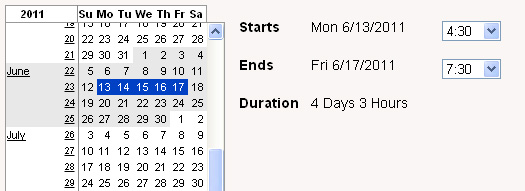
Simple is beautiful; it is fast and efficient – this is how I would introduce Continuous Calendar, a simple jQuery plugin for date range selection. Continuous Calendar allows you to select large or small date ranges from a simple calendar control in a single click.
The interface is just like a simple calendar control but with the ability to drag and select an entire data range easily. This is very practical and useful in scenarios where you have to specify a duration or date range quite often. Continuous Calendar allows to do it without requiring you to find and select start and end dates separately; you do it in a snap – simple and efficient.
Major Features
- Date Dragging
- Range Expand with Shift + Mouse Click
- Display Current Date
- Allow Disabling of Dates
- Month and Week Select
This jQuery date plugin support for different date formats and supports popup.
Requirements: jQuery LibraryDemo: http://reaktor.github.com/jquery-continuous-calendar/src/example.html
Website: http://old.laughingpanda.org/mediawiki/index.php/Continuous_calendar
License: Apache


Arranging images in a montage like fashion can be a challenging task when considering certain constraints, like the window size when using fullscreen, the right image number to fill all the available space or also the size of the images in use. With the following script you can automatically create a montage, either for a liquid container or a fixed size container (including fullscreen), with the option to fill all the gaps.
Having a white space in the end of the container can, as well, be avoided optionally. The last image of the montage can fill the left space, so that the montage will be left gap-less.
Another option that can be useful in some cases is the possibility to only allow that the height of all images will be the height of the smallest image, avoiding that any picture gets pixelated/enlarged. (The default options will allow the enlargement of smaller images if there is a significantly higher number of larger images in the set.)
The images used in the demos are by Andrey Yakovlev & Lili Aleeva. They are licensed under the Attribution-NonCommercial 3.0 Unported License.
lundi 29 août 2011

Diapo is a jQuery plugin for creating content sliders with beautiful and custom transition effects (like curtain and mosaic).
It can display images, videos or any other HTML and can be browsed manually (with prev-next buttons or pagination links that can also display thumbnails) or the auto-slideshow functionality
he plugin is mobile-ready and has options to enable-disable features for mobile usage.
Transitions can also be customized by defining sliced rows-columns, the transition period and more.
Requirements: jQuery, jQuery Mobile, Easing & HoverIntent pluginsCompatibility: All Modern Browsers
Website: http://www.pixedelic.com/plugins/diapo/
Download: http://code.google.com/p/diapo/
MooTools has always gotten a bit of grief for not inherently using and standardizing namespaced-based JavaScript classes like the Dojo Toolkit does. Many developers create their classes as globals which is generally frowned up. I mostly disagree with that stance, but each to their own. In any event, namespaces are technically just nested objects and I recently shared with you how to create and retrieve nested objects with MooTools. With those utility functions available, I've modified Class so that you can create namespaced classes easily!
The MooTools JavaScript
The technique below is very much like monkey patching:
copy(function() {

  // Keep reference to the original Class
  var klass = Class;

  // Redefine class ("that's deep")
  Class = function(name, params, context) {
    // Find out if this is namespaced or the original method
    var namespaced = (arguments.length > 1);

    // Add the class name to the param list
    if(namespaced) params.$name = name;

    // Create and get the original class
    var original = new klass(namespaced ? params : name);

    // If namespaced, set class into namespace
    if(namespaced) Object.place(name, original, context);

    // Return this newly created class!
    return original;
  };

})();
I keep a reference to the original
Class, as I'll be using it within my newClass function. The new signature allows for a namespaced class name, the usual class properties, and the context which may be passed to the Object.place method. The first step is analyzing the arguments provided to Class; if one argument, it's a traditional class; if more than one argument is provided, we know we're trying to create a namespaced class and will act accordingly. You'll also notice that I add a $name property to the class prototype, providing the given class name to the class for later use. I've found the class' declaredClass property incredibly helpful within Dojo.
Here's how you'd use the new Class function:
copy// Create a namespaced class
var myClass = new Class("davidwalsh.ui.Slider", {
  initialize: function() {
    // Do stuff!
  },
  doSomething: function(){}
});
// myClass === davidwalsh.ui.Slider!

// Create an instance of the class
var myInstance = new davidwalsh.ui.Slider({
  // props
});

// Get the name of the declared class
var instanceClassName = myInstance.$name; // equals "davidwalsh.ui.Slider"
The first argument becomes the namespace and class name as a string. The second argument is the traditional parameters argument. If only one argument is provided to the Class function, the class is created and returned per usual; in fact, both the namespaced method and traditional method return the newly created class. The method provided above is completely backward compatible so you wont have rewrite your existing code.
Add Cue Points and Subtitles to HTML5 Video: Cuepoint JS
Posted by YufGrafix | | Category:
Jquery
|
0
comments

Do you do video tutorials or…online presentations and product (video) demos? I do and I watch a lot of video tutorials online; I love them – not all of them. I like brief, to-the-point and professionally illustrated tutorials that I can watch and understand easily. Now what makes a good online video presentation is not just crisp voice and high definition vide0 but the quality of content which includes a knowledgeable presentation with complete subtitles and cue points.
Subtitles or cue points are assistive tools that supplement the talk and allow audience of all types to understand and learn the subject – especially when your audience comes from different cultural/languages backgrounds. You do not have to explain/translate each and everything in the tutorial. Cue points can contain tips, useful information, subtitles or translation that make your online presentation easy to understand.
Adding subtitles or cue points to your videos (HTML5 videos) is quite easy. You just need Cuepoint.js, a simple open source plugin for adding cue points and subtitles to your HTML5 video.
Cuepoint binds external links to certain positions on the video timeline. It also allows you to skip to points within the video, thereby displaying specific subtitles.
Requirements: jQuery LibraryWebsite: http://cuepoint.org/
License: Free
Inscription à :
Articles (Atom)